Popular

IP

This is default featured slide 1 title

Go to Blogger edit html and find these sentences.Now replace these sentences with your own descriptions.

This is default featured slide 2 title

Go to Blogger edit html and find these sentences.Now replace these sentences with your own descriptions.

This is default featured slide 3 title

Go to Blogger edit html and find these sentences.Now replace these sentences with your own descriptions.

This is default featured slide 4 title

Go to Blogger edit html and find these sentences.Now replace these sentences with your own descriptions.

This is default featured slide 5 title

Go to Blogger edit html and find these sentences.Now replace these sentences with your own descriptions.

video

Friday, June 8, 2012

Madagascar 3: Europe's Most Wanted

Here it released!
Fans waited four years since the 2nd of the Madagascar movie released. People all over the world specially kids were enjoyed the movie. Director Eric Darnel and Dreamworkers Animation presented that experience again in June 6, 2012.

Kid’s favorite cartoon actors Alex, Marty, Gloria and Melman are back in Europe, and still trying to get back to their hometown New York City. In order to stay safe from the authorities they have o hide within the boundaries of travelling. The most eye catching gang of Penguins also joins for the entertainment. Polka dots, an afro hairdo dance, awkward love interest and delightful European venue are also presented.

This is the most kid as well as adults friendly movie. And I think this will be the greatest animation movie of the summer. I like to move it. Are you like to move it?


Watch official Trailer:


Wednesday, June 6, 2012

Review: Panasonic Eluga

The Panasonic Eluga is the first smartphone to arrive since the Japanese electronics manufacturer announced its plans to shift over 1.5 million handsets by the end of March 2013, following its re-entry to the European market.
Originally unveiled at the company's European conference in Hamburg in February, and then formally introduced at Mobile World Congress the following month, the Panasonic Eluga dl1 is available from online retailers for around £380 SIM-free in the UK (and $700 SIM-free on Amazon.com in the US, although it isn't listed on the Panasonic US site).
This pitches the company's comeback handset against the likes of the Sony Xperia S and the Motorola Razr - two mobile phones that also boast the same sized display as the Panasonic Eluga at 4.3 inches.

And, for a 4.3-inch smartphone, the Panasonic Eluga is tiny. It's not quite as slim as the 7.1mm Motorola Razr but, with a girth of 7.8mm, it has the same waistline as the HTC One S.
But, because it is around 7mm shorter and narrower, and its extra sharp curved edges bring its lowest thickness measurement down to around 3mm, it appears even slimmer than those competitors at first glance. And it's easily the lightest 4.3-inch-screen mobile phone that we've come across too, at a slender 103g.

One of the key features that Panasonic is keen to push is the Panasonic Eluga's water and dust-proof skills.
It has nabbed itself an IP57 certificate, which means that it can handle a dip into water (up to 1m and for up to 30 minutes) and that dust can't enter in a large enough quantity, thanks to the gaskets and O-rings, to cause it any bother.
We didn't go the whole hog of taking it snorkelling for half an hour, but we did leave it in the sink, under a running tap, and it didn't seem to cause it any problems.

On the top of the Panasonic Eluga are its only moving parts - two flaps that make way for a micro USB port and micro SIM insertion - and these seemed to keep the water out without issue.
You may have already gathered from the lack of a third flap that there's no microSD option on board - a real shame when you consider that built-in storage is a rather underwhelming 8GB.
The display, as mentioned, is a 4.3-inch one with a 960 x 540 qHD resolution, which puts it on a par with the likes of the HTC One S and the Motorola Razr, but it's not quite up to the 1280 x 720 standards that Sony set with the Xperia S.
It's an AMOLED display, which offers vibrant colours and great viewing angles, if somewhat muffled in crispness, thanks to a touch of over-saturation.

The Panasonic Eluga's matt black or silver finish to its back means that it's comfortable to hold and won't suffer too much from smears and fingerprints.
The power and volume rocker button placement isn't ideal, though. They are easy enough to access if you're operating your smartphone southpaw-stylee, but try pushing them with your right hand and you're in for an uncomfortable experience.

The power button, especially, is a tricky little blighter. And we mean little. Sure, Panasonic's gunning for a slimline, minimalist beauty here - but would it really have hurt to make what is a very frequently used button (it also doubles as the sleep/wake one) a bit more accessible?

Also on the back is the Panasonic Eluga's 8-megapixel camera lens, sans-flash, sadly, along with a notification of its NFC capabilities, which we'll come back to later.

The front of the Panasonic Eluga keeps the sharp theme going - not just with the piano black 4.3-inch AMOLED display, but by almost seamlessly blending the screen with the thin bezel.
There's not really much room for anything else up front, save for the Android control buttons, a tiny Panasonic logo, a minuscule speaker grill and a titchy LED for notifications - and if that's one too many superlatives for small, we apologise, but the Panasonic Eluga's raison d'être is its minute attributes.
The Panasonic Eluga is running Android 2.3 Gingerbread for now, although a summer update to 4.0 Ice Cream Sandwich is promised. It runs via a TI OMAP 1GHz dual-core processor, which may have wowed us a bit more last year, before the quad-core revolution hit full wing.

Source: View the original article here

Monday, June 4, 2012

What will happen next in The Vampire Diaries Season 4?


After a shocking end of the season 3 final episode worldwide Vampire Diaries fans are so eagerly looking forward to know what will happen next. But they have to wait until October. But the producer Julie Plec offered something to buzz for the fans throughout this summer. Friendship between Stefan and Caroline will be the major focus of the new season. “I always look at Caroline as Stefan’s future Lexi” Julie told with impassioned face. "You've seen little pockets of a friendship spark between them, and I see Caroline in the long run of the series becoming that important in Stefan's life."
Can you imagine what will bring the pair together when the next season releases? Julie also said "Caroline is an acolyte of the Stefan school of sobriety."
That was a big question for the fans and Julie Plec commented about the Elena’s transition. “It will be a very emotional, very complicated first episode when the show returns, but Elena’s future is pretty set,”.
After transition completed Elena will come back the erased memory by Damon. So what will she do about two boys?

And also fans are waiting, what will happen to Elena’s and Stefan’s never lasting love. Whom will she choose? Will he be Damon or Stefan? The fans also looking forward to what will happen for other characters.  Julie said “Caroline and Mat will have another moment”. The most shocking news is Alaric Saltzman’s return. "As long as Jeremy can see ghosts and Alaric is out there in the universe, then there's a window there," Julie said. Producer Julie said that Bonie’s dad will return in the 4th season. "This year is a big year of transitions. It's the end of senior year, and there's a rich home life for everybody we're going to explore." Julie said.

According to Julie Plec, she said that Damon has grown over the three seasons. And in the 4th season he is going to keep evolving and Elena’s feelings for him are going to continue to evolve.

So waiting until October will be very very hard for the Vampire Diaries fans. DesignCrowd

Sunday, June 3, 2012

Hands-on review: Leica M Monochrom

Although it is based on the Leica M9, the Leica M Monochrom has no colour filter array, so it can only record black and white images.
This means that every one of its 18 million pixels is used to record brightness values, and there is no demosaicing of the red, green and blue signals to create a full colour image.
Removing the RGGB (red, green, green, blue) filter array above the sensor has a number of effects. Firstly, more light can reach the sensor, which is good news for noise control because the signal requires less amplification, which is prone to introducing noise.
The fact that more light reaches the Leica M Monochrom sensor means that it is effectively more sensitive than the Leica M9's sensor, so the base sensitivity setting is higher.

Consequently, the Leica M Monochrom's native sensitivity range runs from ISO 320 to ISO 10,000, but there's also a low-end extension setting of ISO 160. In comparison, the Leica M9's native sensitivity runs from ISO 160 to ISO 2,500, and there's an expansion setting of ISO 80.
Traditionally, Leica cameras are favoured by reportage and street photographers, and these users often need to use middle to high sensitivity settings, so the Leica M Monochrom's higher base setting is likely to be good news for them. Those who need to use very fast shutter speeds or shoot with a wide aperture can resort to shooting with an ND filter over the lens.

Like the Leica M9, the Leica M Monochrom has a 2.5-inch monitor with 230,000 pixels. This is disappointing enough in a camera that has a retail price that's just a shade under £5,000 or $7,000, but it in a camera that retails for around £6,000 in the UK or $8,000 in the US, it is staggering.
Reviewing images on the screen of a pre-production sample Leica M Monochrom revealed that the screen isn't as detailed or as sharp as that of a mid-range DSLR that costs a fraction of the price.

One difference between a Leica rangefinder and a DSLR or compact system camera (CSC), however, is that the screen is only ever used to review images. There is no live view system.
Accordingly, images are composed in the Leica M Monochrom's optical viewfinder. As in the Leica M9, this provides a larger field of view than the mounted lens (down to 28mm), and it displays the most basic exposure information in large red LEDs.

Naturally, focusing is manual only and uses a rangefinder system whereby the lens ring is rotated until the floating image lines up with the one visible through the viewfinder. This takes some care and practice.
Leica's M-series cameras have a build quality that is second to none. It's not really news then that the Leica M Monochrom has a wonderfully solid feel, it is constructed from a single piece of magnesium alloy with a textured leather coating and brass top and bottom plates. It is a thing of beauty.

Although its body is large in comparison with the current crop of mirrorless compact system cameras, it's important to remember that the Leica M Monochrom houses a full-frame sensor and it is considerably smaller than the full-frame DSLRs that are currently on the market.
Although the LCD screen isn't the most detailed, it is useful for checking exposure, since the shadow and highlight warnings can be set to operate at levels that suit the photographer. The warnings are shown in red, which stand out well against the monochrome image.

Like the Leica M9, the Leica M Monochrom has none of the exotic modes found on the average digital camera - it is intended for use by a photographic purest who wants to concentrate on the key aspects of exposure and composition.
Nevertheless, it is possible to select one of three tones (Sepia, Cold and Selenium), which can be applied to JPEG images as they are recorded. There are also a number of filter options that emulate the effect of using optical filters on black and white film photography.
As yet we have only been able to inspect the results from a pre-production sample of the Leica M Monochrom, but they are very impressive. Noise appears to be very limited, and even in the shadows shots taken at ISO 2500 have only a fine grain visible at 100 per cent on the computer screen. Tonal gradations also look natural and smooth.
We spoke to Leica Akademie tutor Brett (he doesn't use his last name) who used the Leica M Monochrom with the new Leica APO-Summicron-M 50mm f/2 ASPH lens (£5,400/$7,195) for a couple of days. He told us that although he is very impressed with the camera, it will take a little while before he learns how to get the absolute best from the DNG format raw files.

Because he has found that the Leica M Monochrom records a lot of detail in shadows and noise isn't a major issue, he recommends that images are exposed for the highlights.
He's also a fan of the new Summicron 50mm lens, but warns that it is so sharp that it emphasises the drop-off in focus, which is quick, so it's absolutely essential to get the focus spot-on, especially when shooting wide open.

Clearly with a retail price of around £6,000 in the UK or $8,000 in the US, the Leica M Monochrom isn't going to sell in huge numbers, but from the reaction to its launch it is obvious that it holds huge appeal to the Leica faithful. It seems to sum up both the history and the future of Leica as a great photographic brand.
It's about getting the best black and white photo possible, and this means gathering the maximum amount of luminance data in-camera. It comes with Adobe Lightroom and Nik Silver Efex Pro 2, recognising that in the modern age some adjustment is often necessary to get the desired look.

Results may look good straight out of the camera, but there is usually room for improvement. Traditional black and white photographers shoot to produce a negative that has all the information required to create a print, and dodging and burning are just part of the process. It's just the same with digital photography.
While the Leica M Monochrom can produce JPEGs for that instant result, the DNG raw files have the most data for manipulation.

It's early days yet, and we have yet to test a full production sample, but the Leica M Monochrom looks like it could be the ultimate camera for shooting black and white images.
We anticipate that many well-heeled and professional Leica users will invest, keeping their existing Leica M9 or Leica M9-P for colour work while the Leica M Monochrom is reserved for black and white shooting. Nice.

Source: View the original article here

Alienware X51

Dell's gaming-centric Alienware brand has gone down the console form factor route with its Alienware X51 PCs. The erstwhile X51 though has recently had a little open-heart surgery to give it a new Ivy Bridge beat to its processor rhythm.
The X51 is about the same size as the original Xbox 360 and is obviously angling this machine deliberately as some sort of simpler gaming machine compared to the normal desktop giants. That said it does have the look of an angular corporate chassis from the HR department of some Men in Black-style organisation rather than a 1337 gaming box.
But this is being targeted as a gaming machine, capable of delivering "an immersive HD gaming experience so you can meet any challenge", so says the Alienware concession housed in the Dell website. While it's certainly capable of reasonable HD gaming performance, I think it's going to struggle to meet any challenge. And the 'graphics for greatness' tag is rather overselling the meek little Nvidia GTX 555 graphics card humming away inside the cramped chassis.
Having said that though, you have to admire Alienware for sticking to its desktop guns. It would have been easy to try to knock out a small form factor desktop machine using notebook parts, a la the nettop. The much-maligned nettop.
So it's with pleasure that we see the meek little GTX 555 is a proper desktop variant, with dual-slot cooling and a proper PCIe 6-pin power connector. While it's no gaming powerhouse in graphical terms - with 288 CUDA cores and a 192-bit memory bus it's not going to be setting the world alight with flying polygons - it's still way ahead of a lot of the mid-range notebook graphics around. In fact this OEM only card seems to be almost identical to the GTX 560 SE that was released by a few add-in board (AIB) partners in the spring.
The version we've reviewed has got the original Intel Core i7 2600 inside, but for the same price Alienware has replaced that chip with the new Core i7 3770. As you'll know from our Ivy Bridge coverage there's not a lot between the two chips in performance terms, certainly not in gaming performance with a discrete GPU.
So what actually is going on inside the X51? Well, it's a rather smartly designed and well-engineered machine, managing to squeeze all the necessary desktop components into a diminutive form factor.
The motherboard Alienware is using inside is a tiny H61, with a pair of DIMM slots and one x16 PCIe 2.0 connection. In order to maintain the clean, pseudo-corporate lines the graphics card is connected via a PCIe riser board, which allows the card to be mounted parallel to the main motherboard.
To be honest, the engineering around the graphics card is the most impressive thing about the X51 and the fact that it is relatively simple to remove and replace has to be applauded. So long as you can find a graphics card of a similar sort of size to the OEM GTX 555 then you'll be able to find a home for it.
In fact, the GTX 670 fits inside nicely, and with the 150W TDP of the GTX 555 you could expect to be able to find the juice in the 300W PSU of the X51 to keep it juiced-up happily. There's even a spare 6-pin PCIe power connector inside the chassis just waiting for a more powerful graphics card to take its place inside.
In those twin DIMM slots lies two 4GB sticks of 1,600MHz DDR3, in dual channel configuration. A full 8GB of system memory is more than enough for any game you care to throw at it and, in fact, for most productivity tasks too.
The only really sad note is that, while it's laudable that Alienware is offering the Ivy Bridge i7 for the same price as the i7 2600, it's not changing the chipset it sits in. Alienware is using the self same H61 chipset for the Ivy Bridge CPUs as it does throughout the rest of its lineup. That makes sense for the build of the machine, keeping to the same layout, but it means you're losing some of the goodness of the new platform.
CPU rendering performance
Cinebench R11.5: Index score: Higher is better
ALIENWARE X51: 6.86
CHILLBLAST FUSION ROCKET: 7.12
CPU encoding performance
x264 v4.0: Frames per second: Higher is better
ALIENWARE X51: 36
CHILLBLAST FUSION ROCKET: 36
DirectX 11 tessellation performance
Heaven 2.5: Frames per second: Higher is better
ALIENWARE X51: 9.1
CHILLBLAST FUSION ROCKET: 15.6
DirectX 11 gaming performance
Metro 2033: Frames per second: Higher is better
ALIENWARE X51: 11
CHILLBLAST FUSION ROCKET: 22
DiRT 3: Frames per second: Higher is better
ALIENWARE X51: 40
CHILLBLAST FUSION ROCKET: 62
DirectX 10 gaming performan
Just Cause 2: Frames per second: Higher is better
ALIENWARE X51: 38
CHILLBLAST FUSION ROCKET: 39
Most notably the native USB 3.0 and PCIe 3.0 connectivity. The first isn't a massive loss as there are still two USB 3.0 sockets, though not native, sat on the rear of the H61 motherboard. The lack of PCIe 3.0 connectivity is somewhat more of a problem - maybe not now but moving forward with this machine it might be.
The actual design of the chassis is another concern. There's nothing really wrong with the build quality of it, and the way it has been designed to fit full desktop components into a small form factor is excellent, it's just that it feels so flimsy and plasticky. There's a lot of give in the surrounds of this machine, something that doesn't exactly scream £900 worth of quality.
In terms of raw performance you'd have to say the Alienware X51 is no behemoth of the gaming world. It's most definitely capable, but it's a bit of a stretch to see this as on par with any other £1,000 rig out there on the market. Granted prices of gaming machines have risen with the latest round of graphics card and CPU releases, but even the sub-£1,000 rigs we've tested since the Sandy Bridge launch have the edge in terms of performance metrics.
Indeed, if you look back 12 months we reviewed the Chillblast Fusion Rocket, a £750 Sandy Bridge machine with the excellent AMD HD 6950 as its graphics grunt. The Core i5 CPU came overclocked, which gave it CPU performance rather close to that you'll see from even the Ivy Bridge chip. Which you'll note isn't one of the 'K' series CPUs, and as such has the locked multiplier that these days means no overclocking allowed. With the geriatric-looking CPU cooler sat inside the X51 that's probably for the best though.
In games performance too the old Chillblast machine has the edge, posting double the Metro 2033 performance of this Alienware rig. The DirectX 10 performance of the Nvidia GTX 555 makes things much closer, but then you don't buy a new, gaming-branded machine for around a grand and hope that it'll cope with games a generation further back in time. You buy a £1,000 gaming PC to play the latest games and to play them well.
Sadly, even at 1,920 x 1,080, you know the Full HD that Alienware is talking about on its site is lacking with the GTX 555. So despite having serious desktop rig credentials - offering full access to the CPU, giving the option of upgrading the GPU at a later date - the Alienware X51 doesn't quite have it where it counts. The form factor may be pleasing, but you're certainly paying over the odds for the sort of gaming performance you'll see spat out at the end.
It's a shame that Dell isn't offering the machine as a barebones system for a decent price. Being able to drop in your own CPU and GPU combo would make this a far more appealing proposition. A low-powered Core i5 2500 with a tasty little GTX 670 would make for one serious gaming rig, and would make mincemeat out of this gaming also-ran.


Source: View the original article here

Sony Xperia U

The Sony Xperia U is the third of Sony's new wave of Android smartphones, using the same styling as the much larger Xperia S and the slightly larger Xperia P.
The Sony Xperia U is the smallest of the three handsets, offering a 3.5-inch TFT display inside the same angular, black case as the Xperia S and Xperia P, and an odd transparent plastic strip acting as part design feature, part information panel and part silly light-up novelty.
Prices are relatively modest for a modern smartphone that says "Sony" on it, with the Xperia U popping up for around £169 on Pay As You Go or £215 SIM-free in the UK, or $340 SIM-free in the US. But can you really get the style of the Xperia S on a budget?

It's pretty close. The Sony Xperia U is small and solid, offering much the same in balance and build quality as last year's excellent Sony Xperia Ray, with Sony putting three capacitive touch buttons beneath the display, indicated by tiny silvery dots.
There's an explanatory icon embedded in the transparent strip, telling Android newcomers these buttons are, from left to right, Back, Home and Menu.
The touch areas are big and very sensitive to presses, meaning it's easy to use the phone without thinking too much about your actions or having to aim your button stabs.
The smaller 3.5-inch display makes the Sony Xperia U fit the hand well, so one-handed use is possible with ease, too.
Above the screen sits the front-facing VGA camera, which can be toggled and selected within the camera app, producing low-res images that emerge from the camera at 640 x 480 resolution.
There's also a proximity sensor up here so the phone knows if you're holding it to your head and can dim the screen accordingly.
The sides are black with rather flimsy and plasticky buttons, with the 3.5mm headphone jack up top and the USB connector top left.
The right-hand side of the Sony Xperia U is where the party starts, because this edge houses the power button, which is nice and easy to find at the top right, along with the volume up/down rocker in the middle, then the camera button bottom-right.

The chunky power button's easy to find and the physical camera shutter button is always a useful thing to have, especially since the latter brings up the camera app when held down for a second or two, even when the phone's in standby.
The camera button is quite flat and well recessed into the Sony Xperia U's case, meaning you have to press it pretty hard to make it focus and register. We tended to end up using the on-screen button to take shots instead, because it's just easier.

And there's your big, exciting design feature - the strip lights up. In more than one colour. It's quite cool, especially when viewing photos in the gallery, because the Sony Xperia U detects the most prominent colour in the shot, then alters the colour of this strip accordingly.
It's hard to take a photo of. The strip's much brighter and more colourful to the human eye, more so in the dark.

And if you're even more colour obsessed, the black plastic beneath the see-through strip can be unclipped and replaced with something brighter. White. Or Pink. Or yellow. Which is great, if you're a child.

Removing the back is a rather hard and worrying experience. You have to press it down and push it up, which means squeezing the phone quite tight and putting a lot of pressure on the display.
We were quite worried we'd end up breaking the display from the pressure. But we didn't. We should probably stop worrying so much.

Inside the Sony Xperia U sits a full-size SIM card slot, although there's no SD support in here, so you're stuck with the relatively tight 4GB of accessible storage space Sony has put in here.
That's a bit of a shame, but at least the battery is replaceable, which will earn the Sony Xperia U some brownie points in this age of sealed, non-accessible phones.
All of this comes together to give the Sony Xperia U a quality, well-made feel, that does indeed ape the design of the high-end Sony Xperia S rather well.
It feels tough and durable, the display and buttons are sensitive, while the smaller 3.5-inch screen is bright and clear, so much so that it could be considered a worthy replacement for many bigger, more costly Android models.
Source : View the original article here

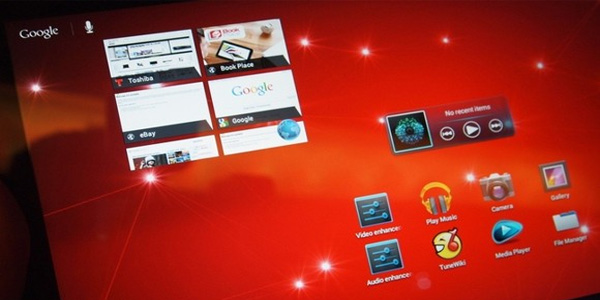
Hands-on review: Toshiba AT300

Premier partnerSamsung

Toshiba's latest 10.1-inch tablet is a fine attempt to undercut the new iPad – it comes in at £329 for the 16GB version and £379 for the 32GB variant.
The device will be known as the Toshiba Excite 10 in the US. Quite why Toshiba has decided to give the UK a lesson in boring branding is anybody's guess.
Tosh hasn't exactly set the world alight with its tablet offerings thus far, but the AT300 packs quad-core Nvidia Tegra 3 as well as Android 4.0 Ice Cream Sandwich. It's no slouch in terms of specs or when it's in use. The AT300 replaces the AT200 which featured a dual-core processor and Android 3.0 Honeycomb (the AT200 was also priced more expensively, too).
The biggest problem Android tablets have is standing out from the crowd and offering consumers a compelling reason why they shouldn't go and buy an iPad. Unfortunately the AT300 doesn't really give a truly compelling reason, but that price point competes effectively with the iPad 2.
It's nice and light at 590g, while the aluminium finish feels very nice in the hand. It's also pancake thickness at 8.95mm. The footprint is 261 x 179mm. The glossy 1,280 x 800 LED display is Gorilla Glass for extra strength. The display is crisp and bright, though pales in comparison to the new iPad or an OLED display.
As you'd expect there are two cameras – a 5MP one on the rear (with LED flash) and a 2MP on the front for video calling. The AT300 also features a full-size SD card slot so you can build on the internal storage of either 16GB or 32GB.
We're not dead keen on the edges of the device, but there's plenty to be pleased about, with micro HDMI and micro USB ports and single 3.5mm headphone jack/mic in addition to that SD slot. A 10 hour battery life is cited - we'll have to test this out properly when we get our AT300 review sample.
The Toshiba AT300 release date is June.


Source: View the original article here
Related Posts Plugin for WordPress, Blogger...